
Coal
For a small community
per month, billed monthly
What's included:
- 3GB DDR5 memory
- 2 vCPU · Ryzen® 9 7950X
- 30GB NVMe storage
- 1 backup
- 3 ports
 MinecraftMinecraft server hosting
Minecraft server hosting for survival worlds, Paper plugins and Forge or Fabric modpacks. Bring your friends and make the world yours.
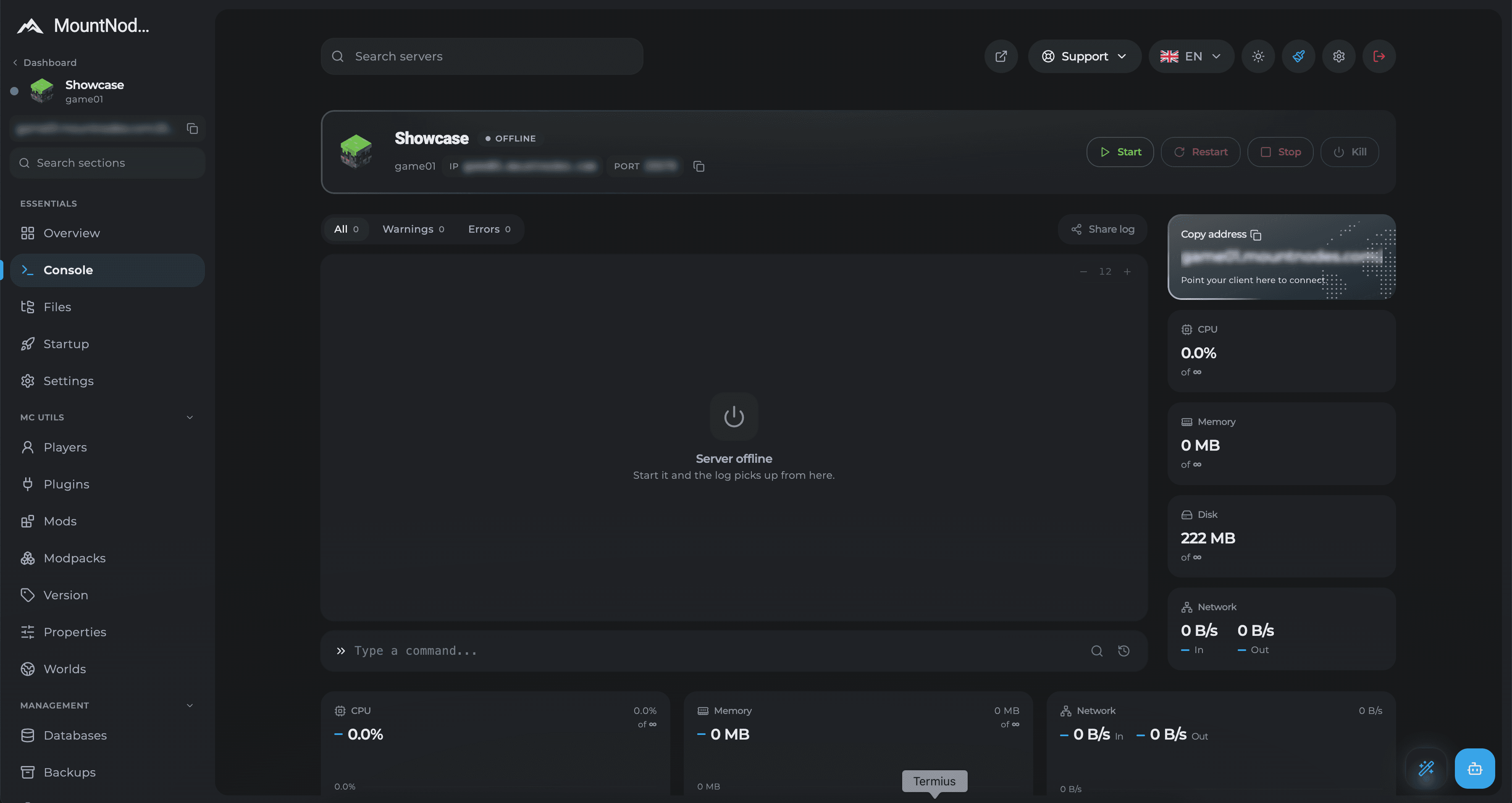
Manage your worlds, plugins, mods, and server settings from one panel.
Upload an existing save or start with a fresh world. Manage your world folders through the file manager or SFTP, and set the world you want to load in server.properties. Stop the server and keep a backup before replacing files.
Your world files
Your worldyour progress
Keep your builds and saves
Add land claims, permissions, economies, and minigames with compatible plugins. Upload plugin JARs to your plugins folder, restart the server, and edit their configuration files from the panel.
Build your community
Your setupyour rules
Match plugins to your server version
Run a modded world using the loader and Minecraft version your pack requires. Upload the server pack files and configure the startup settings for your setup. Check the pack’s memory requirements before choosing a plan.
Plan your modded server
3–12 GBDDR5 memory
Choose resources for your pack
Read the server log, send commands, and start, stop, or restart your server from the panel. Update your allowlist, manage operators, and check errors when a plugin or mod needs attention.
Everyday server commands
One panelconsole and files
Manage your server in your browser
Create a backup before updating Minecraft, adding a plugin, or changing your modpack. If something goes wrong, restore a saved copy. Every Minecraft plan includes backup slots; the number depends on your plan.
Good times to back up
1–4backup slots
Included with your Minecraft plan
Edit server.properties and your software’s configuration files. Choose your game mode, difficulty, allowlist, and view distance. Restart when required to apply changes, and balance view distance against your server’s resources.
Make it yours
Your serveryour settings
Configuration files at your fingertips
What to know about memory, mods, moving your world, and hosting your Minecraft server.
Can't find your answer?
Our team replies in Discord within the hour.
Choose a Minecraft server that fits your community. Plans from €5.99/month.
Pick your use case to find a starting plan.
For a small community
per month, billed monthly
What's included:
MinecraftMore room to grow
per month, billed monthly
What's included:
MinecraftFor bigger adventures
per month, billed monthly
What's included:
MinecraftOur largest standard plan
per month, billed monthly
What's included:
MinecraftTell us about your Minecraft server and the resources you need. Contact our team for a tailored quote.